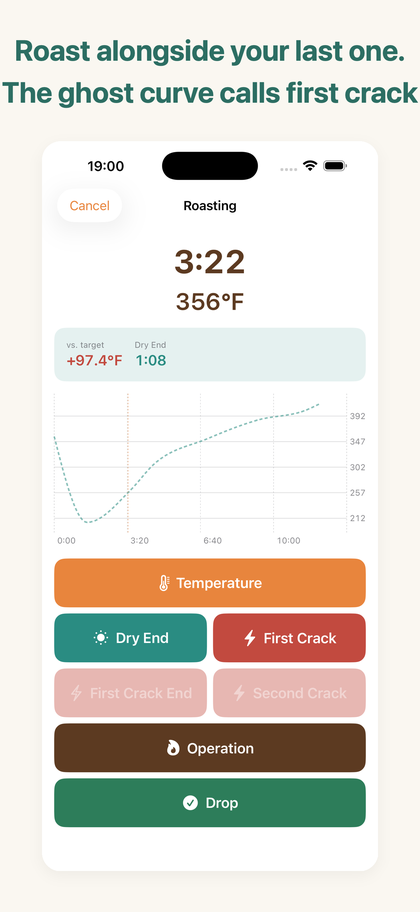
Roast alongside your last one.
HazeLog is a roast-curve logbook for people who roast coffee on a stovetop pan, hand-net or small home roaster.
Save the roast you got right, then run alongside that curve next time to recreate it.
iPhone and iPad / iOS 17.0 or later · 10 languages · fully offline
No probe required
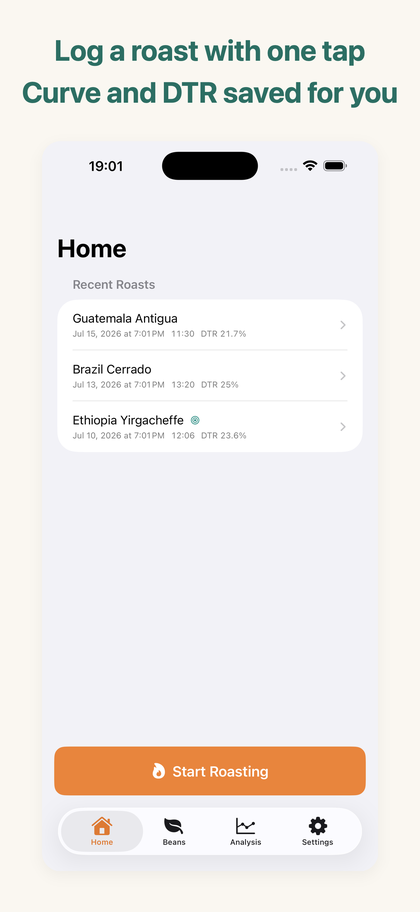
One tap per event
Charge, temperature, first crack, second crack and drop — each on a 64pt button, designed for one gloved hand and a glance. A mistap can be undone for five seconds.
It becomes a curve
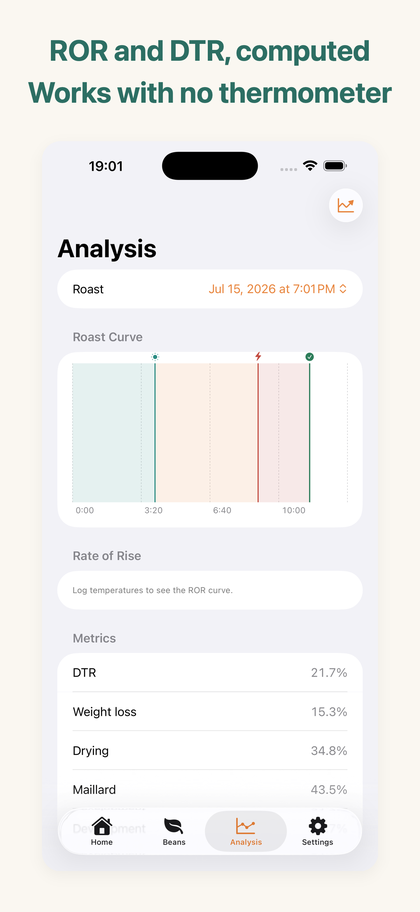
What you tap turns into a time-versus-temperature roast curve, with drying / Maillard / development phase bands and event markers.
Works with no thermometer
Temperature is optional. Even with only first crack and drop, your event timeline and DTR still hold up as a record.
Pick up where you left off
A phone call or a crash mid-roast no longer costs you the record. Next time you open HazeLog it asks whether to resume the interrupted roast.
Fix it later
Date, charge weight, roasted weight, roast level, the bean — and the time and temperature of every event — can all be edited after the fact, so a typo never poisons your weight loss or DTR.
Photos and conditions
Attach up to three photos per roast (kept on device only) plus room temperature, humidity, heat source, cooling method and flavor notes.
The ghost curve — turn a record into a guide
Mark a past roast as a target profile and its curve is overlaid faintly on the live screen. While you roast, you can see how many degrees you are above target and how long until the next crack.
The ghost curve, ROR curve, phase ratios, batch comparison and CSV/PDF export unlock with the one-time HazeLog Pro purchase. DTR is free, in the list and on every roast.
Backup and restore — free
From Settings → Backup & Restore you can export one file holding every roast, bean, event, note and condition. Load it on a new phone and everything is back. You choose whether photos are included.
CSV and PDF are for analysis and sharing; only a backup can be restored. Both export and import happen entirely on your device — nothing is uploaded.
Free and Pro
| Feature | Free | HazeLog Pro |
|---|---|---|
| Live logging, curve and saving | Unlimited | ✓ |
| Heat and damper operation log | ✓ | ✓ |
| Editing records and resuming a roast | ✓ | ✓ |
| Backup and restore | ✓ | ✓ |
| Photos, conditions and flavor notes | ✓ | ✓ |
| Green bean master | Up to 3 beans | Unlimited |
| Ghost curve (replay mode) | — | ✓ |
| ROR curve and phase ratios | — | ✓ |
| Batch comparison view | — | ✓ |
| CSV / PDF export | — | ✓ |
HazeLog Pro is a one-time purchase, not a subscription, and can be restored at any time.
How it works
- Register a green bean in the Beans tab.
- Tap Start Roasting, pick the bean and charge weight, then tap Charge.
- Log temperature, first crack and drop with one tap each (temperature optional).
- Enter the roasted weight afterwards and weight loss is computed for you.
- Mark a roast you liked as a target profile — the next roast runs alongside its ghost curve.
FAQ
Can I use it without a thermometer?
Yes. Temperature is optional. Logging just first crack and drop still gives you a complete event timeline and DTR.
Does it connect to a temperature probe?
No. HazeLog is built around manual logging. BLE probe integration is out of scope; it targets stovetop pans, hand-nets and small home roasters.
Can I use Fahrenheit?
Yes. Switch between °C and °F in Settings. Readings are stored in one normalized unit internally, so past roasts stay comparable when you switch.
Where is my data stored?
Everything stays on your device. No uploads, no tracking, no ads, and no account. The app works in airplane mode.
Is it a subscription?
No. HazeLog Pro is a one-time purchase. Buy it once and keep it.
Can I back up my roasts?
Yes. Settings → Backup & Restore exports one file with every roast, bean, event, note and condition, and imports it on another device. It is a free feature, and you choose whether to include photos. CSV and PDF (Pro) are for analysis and sharing and cannot be imported back. iCloud sync is under consideration for a future version.
What if the app quits mid-roast?
Nothing is lost. The next time you open HazeLog it detects the interrupted roast and asks whether to resume or discard it. Events are written to the device as you tap them.
Can I correct a record afterwards?
Yes. Open a roast and tap Edit to change the date, charge weight, roasted weight, roast level and bean, and to fix or delete individual event times and temperatures. Changing the charge weight adjusts your green bean stock automatically.
Are photos uploaded anywhere?
No. Photos are stored only on your device, and you decide whether they go into a backup. HazeLog uses the standard iOS picker, so it never asks for photo library access.
About the Android version
An Android version of HazeLog is in preparation. It supports Android 9.0 and later and will be published on Google Play.
Both implementations are checked against the same verification data so that the Android build calculates and judges exactly as the iOS one does. Storage and backup behaviour is described in the privacy policy.
We are not linking to a store page until it is live. We will announce it here and on the support page.
HazeLog
Available on the App Store for iPhone and iPad (iOS / iPadOS 17.0 or later).
View on the App Store